A calculator lead magnet is an interactive tool that gives your visitors a personalized number, like their daily calorie needs or their BMI, in exchange for their email address. It’s one of the highest-converting lead magnets a coach can use: interactive tools convert around 26% of visitors on average, while a typical opt-in page converts closer to 7%.
Here’s the frustrating part. Most coaches already know their PDF freebie isn’t working. You spent a weekend writing “10 Tips for More Energy,” posted it everywhere, and got a handful of downloads from people who never opened your emails. It’s not that your advice is bad. It’s that nobody feels like another PDF is about them.
A calculator is different because the result is about them. Their number. Their body, their goal, their next step. In this guide, we’ll cover why calculators outperform static freebies, which calculator fits your coaching niche, how to set one up without touching code, and what to do with the leads once they arrive.

Key Takeaways
- Interactive tools like calculators convert at 26.44% on average, compared with 22.16% for all lead magnet forms and a 6.6% median for landing pages overall.
- The best calculator for you depends on your niche: BMI for weight loss coaches, BMR and calorie or macro calculators for nutrition coaches, and a transformation timeline for personal trainers.
- The results page decides whether a lead warms up or leaves. Show the number, explain what it means, and point to one clear next step.
- Results appear on screen right after submission. A follow-up email is optional, but the coaches who set one up get a second conversation for free.
- You can launch a calculator lead magnet in about 10 minutes with a pre-built template. No formulas, no code.
What Is a Calculator Lead Magnet?
A calculator lead magnet is a small interactive tool on your website or link in bio. A visitor enters a few details, like age, weight, height, and activity level. Before they see their result, they leave their name and email. Then the tool shows a personalized number with context around it.
The exchange feels fair to the visitor. They’re not handing over their email for a vague promise. They’re getting an answer to a question they already had, in under a minute.
For you as a coach, the value goes beyond the email address. The answers themselves tell you who this person is. Someone who selects “lose weight” and “sedentary” needs a very different first conversation than someone who selects “build muscle” and “trains 5 days a week.” A PDF download can’t tell you any of that.
That’s the real difference. A PDF collects emails. A calculator collects context.
Why Calculator Lead Magnets Beat PDF Downloads
The numbers here are worth pausing on, because the gap is bigger than most coaches expect.
MailerLite analyzed over 41,000 lead capture forms from more than 10,000 of its users. Interactive tools, meaning calculators and quizzes, converted at 26.44% on average. The average across all form types was 22.16%, and simple discount offers converted at just 16.2%.
For contrast, Unbounce’s analysis of 41,000 landing pages puts the median conversion rate across industries at 6.6%. A well-placed calculator can realistically convert at 3 to 4 times the rate of a standard opt-in page.
Engagement follows the same pattern. Research from Mediafly found that interactive content gets 52.6% more engagement than static content, and that people spend about 13 minutes with interactive content compared with 8.5 minutes for static pieces.
Why does this happen? Three forces stack up in your favor:
- Curiosity about yourself. “What’s my daily calorie baseline?” is a question with a personal answer. “10 nutrition tips” is not.
- Low commitment. Answering 5 quick questions feels easier than downloading, saving, and reading a 12-page PDF.
- Instant payoff. The result appears right away, on screen. No inbox digging required.
There’s a fourth force that matters just for coaches: qualification. Every answer a lead gives is information you’d normally spend the first 15 minutes of a discovery call collecting. The calculator does that part before you ever speak.
If you’re still weighing interactive tools against classic freebies, we broke down the full comparison in quiz funnels vs lead magnets.
The 4 Calculator Types That Work Best for Coaches
Not every calculator fits every practice. The goal is to match the number you offer with the conversation you want to start. Here are the four that work best, and who each one is for.
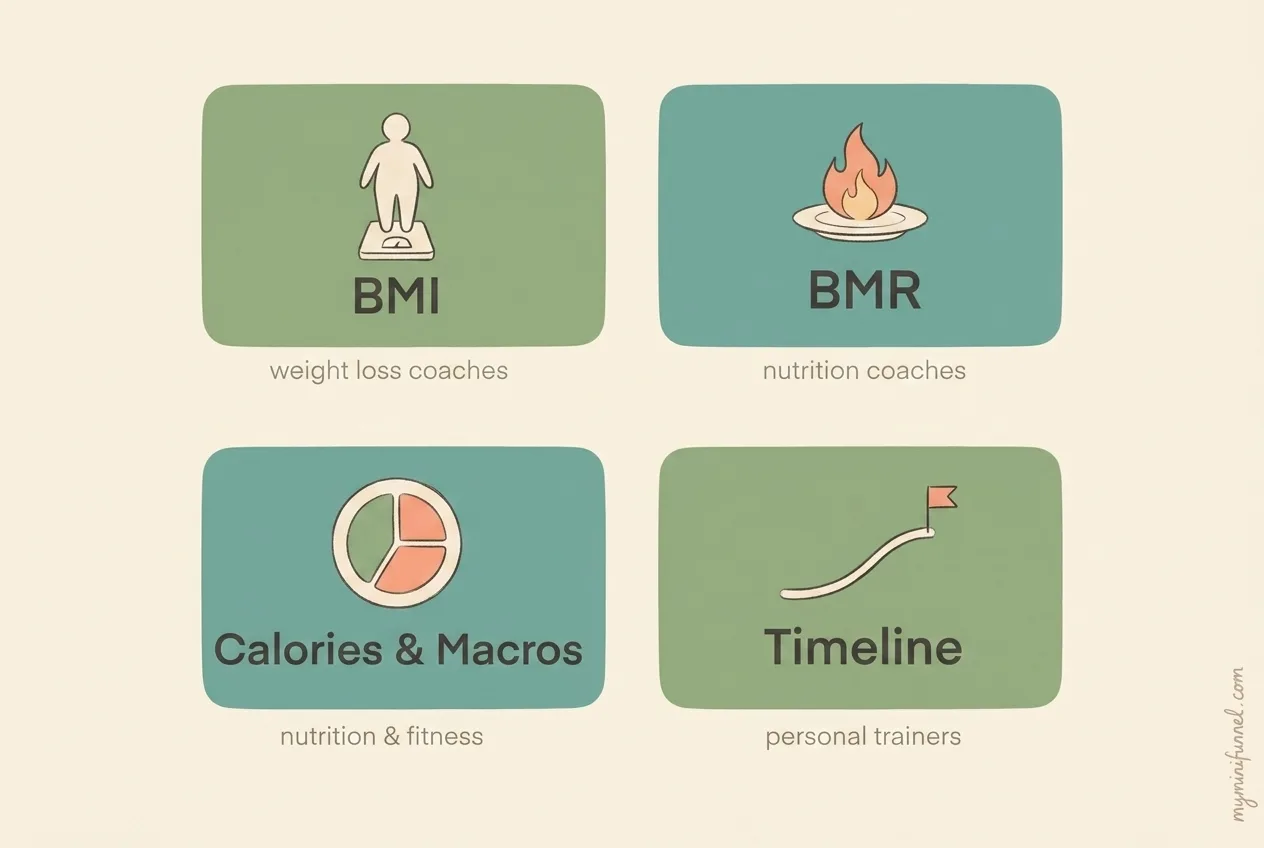
BMI Calculator: Weight Loss and Health Coaches
The BMI calculator is the simplest entry point. Visitors know what BMI is, they’re curious about theirs, and the input takes seconds. That familiarity is exactly what makes it convert.
The catch is that BMI is a blunt measure, and your results page needs to say so. Position the number as a starting point for a bigger conversation about health, not a verdict. We wrote a full setup guide in the BMI calculator lead magnet post, and the BMI Calculator template is ready to customize.
BMR Calculator: Nutrition Coaches
BMR, the number of calories the body burns at rest, attracts leads who are already thinking about energy and eating. It filters for people asking better questions than “how do I lose weight fast.”
The result also sets up a natural coaching hook: your BMR is a baseline, not a target, and turning it into a real plan is exactly what a coach helps with. The BMR calculator guide covers the details, and the BMR Calculator template handles the formula for you.
Calorie and Macro Calculator: Nutrition and Fitness Coaches
This is the warmest lead of the group. Someone asking “how much protein should I eat per day” is usually past curiosity and into planning mode. They’ve tried tracking before, or they’re about to start.
A calorie and macro calculator gives them targets based on their goal and activity level. Your results page can then be honest about the hard part: knowing your macros is easy, hitting them consistently for 12 weeks is what people fail at alone. That’s your opening. The Calorie & Macro Calculator template is built for this exact flow.
Body Transformation Timeline: Personal Trainers
This one answers the question every PT hears in a first consult: “how long until I see results?” The visitor enters their starting point and goal, and gets a realistic timeframe.
It works because it does two jobs at once. It captures the lead, and it sets honest expectations before you ever talk. Leads who arrive already understanding that a transformation takes months, not weeks, are better clients. The Body Transformation Timeline template maps this out.
Not sure which fits? Browse all of them in the template library and pick the one that matches the first question your ideal client usually asks.
How to Set Up a Calculator Lead Magnet (Step by Step)
Here’s the honest version of what setup looks like when you use a pre-built template instead of building from scratch.
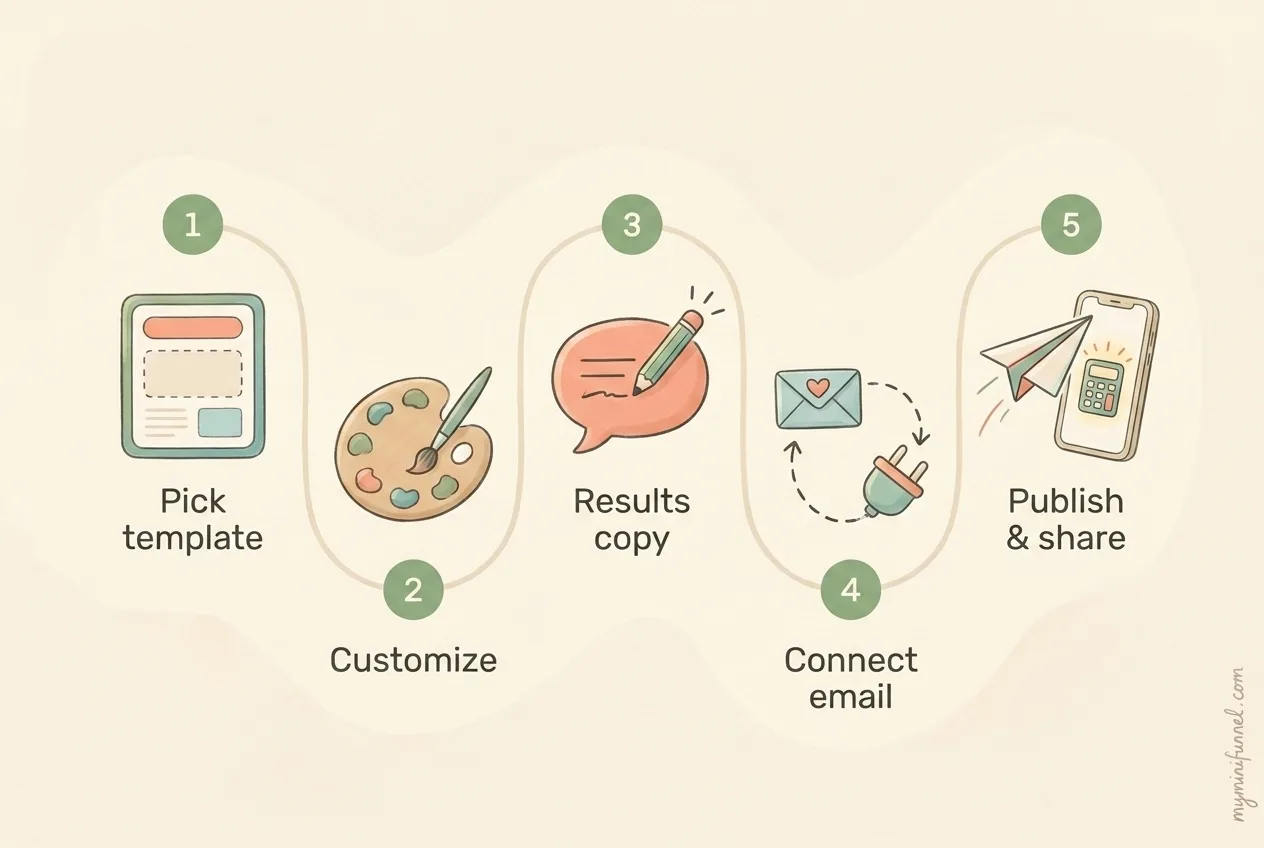
Take Elena, a nutrition coach with about 4,000 Instagram followers. Her “7-Day Meal Prep Guide” PDF got 9 downloads in two months. On a Sunday evening, she swapped it for a calorie calculator. The whole change took her one cup of tea:
- Pick the template. Elena chose the Calorie & Macro Calculator, since most of her DMs were questions about eating, not workouts.
- Customize the look. She set her brand colors, uploaded her logo, and rewrote the intro line to sound like her: “Find your real calorie target, not the one a generic app guessed.”
- Edit the results copy. This is the step most people skip and the one that matters most. She wrote two sentences under the result explaining what the number means and what it doesn’t.
- Connect her email tool. She linked her MailerLite account so every new lead landed in her list automatically.
- Publish and place the link. She put the calculator link in her Instagram bio and mentioned it in her next three stories.
First week: 34 completions, 21 new email subscribers. Not viral numbers. But that’s 21 people who told her their goal, their activity level, and their biggest obstacle, compared with 9 anonymous PDF downloads in two months.
The technical part is genuinely the easy part now. With My Mini Funnel’s templates, the formulas, mobile layout, and email capture are already built. Your work is the copy and the follow-up, which is coaching work, not tech work.
What to Show on the Results Page
The results page is where a calculator lead magnet earns its keep or wastes its chance. A bare number ends the relationship. A number with context starts one.
Every good results page does four things:
Show the number clearly. Big, visual, immediate. This is what they came for, so don’t bury it under a paragraph of disclaimers.
Explain what it means in plain English. “Your estimated daily target is 1,850 calories. That’s the intake that supports your goal at your current activity level, not a number to hit perfectly every day.”
Say what it doesn’t mean. This is where you sound like a coach instead of a widget. “This estimate doesn’t know your training history, your stress, or your sleep. Those change the plan.” One honest limitation builds more trust than ten bold claims.
Point to one next step. Not three options. One. Book a call, reply to the welcome email, or take the next assessment. A results page with a single clear step outperforms a menu.
Think about the last time you used an online calculator yourself. You probably got a number, shrugged, and closed the tab. That shrug is the moment your results copy exists to prevent.
How to Follow Up With Calculator Leads
Here’s how the flow actually works, because it’s worth being precise: when someone completes your calculator and submits their email, their results appear on screen right away. Nothing is sent automatically. If you want them to also get an email, you set up an automatic follow-up yourself and drop the {{results}} placeholder into it, which sends them their personalized numbers.
Set that email up. It takes five minutes and it doubles your touchpoints with every lead.
A simple three-email sequence is enough:
- The results email (right away). Their numbers, one paragraph of context, and a soft pointer: “Reply and tell me your goal. I read every message.”
- The obstacle email (2 days later). Name the most common reason people with their goal get stuck, and give one fix they can use today. No pitch.
- The invitation email (4 to 5 days later). A direct, low-pressure offer: “If you want a plan built around your actual numbers, here’s my calendar.”
Tom, a personal trainer in Manchester, ran exactly this sequence behind his transformation timeline calculator. One lead, a 41-year-old dad named Chris, got his timeline on a Tuesday, replied to the first email with “is 6 months really realistic?”, and booked a consult that Friday. Tom’s take afterward: the calculator didn’t sell anything. It just started a conversation he used to have to chase.
Because the calculator stores every answer with the contact, you can also segment your follow-up. Leads who chose “lose weight” get a different email 2 than leads who chose “build muscle.” That’s the kind of relevance that makes people feel like you already understand them, and it takes minutes to set up when the data is sitting in your contact list.
For more on where calculator leads fit in your wider list-building, see our roundup of lead magnet ideas for coaches.
Where to Promote Your Calculator
A calculator nobody sees converts nobody. The good news: promotion is mostly about placing one link where your audience already looks.
- Link in bio. The highest-value spot for social-first coaches. Use a curiosity line above it: “Find your real calorie target in 60 seconds.”
- Instagram stories. Walk through the calculator on camera once a week. Showing the result screen works better than describing it.
- Pinned post or reel. A 20-second demo reel of the calculator can keep pulling leads for months.
- Your website. Put it on your homepage and your about page, anywhere a curious visitor might stall.
- Email signature and DMs. When someone asks a “how much should I eat” question in DMs, the calculator link is a helpful answer, not a pitch.
One placement tip that costs nothing: mention the result, not the tool. “Find out your number” beats “try my calculator” because people want the answer, not the software.
Mistakes That Kill Calculator Conversions
We’ve watched a lot of coaches launch calculators. The ones that underperform usually hit one of these five problems:
- Asking for the email too early. Let people answer the questions first. Once they’ve invested 45 seconds, the email feels like the last small step instead of a toll booth.
- Too many questions. Five to eight inputs is the sweet spot. Every question past that point trades conversion rate for data you probably won’t use.
- A naked result. A number with no interpretation reads like a free tool, not a coach. Write the two sentences of context. It’s the highest-use copy you’ll write all year.
- No follow-up email. The lead was warm the moment they finished. Waiting a week to “batch” your outreach wastes exactly the window where they were thinking about their result.
- Overpromising accuracy. Calling an estimate a diagnosis erodes trust and can wander into territory that isn’t yours to claim. Honest framing (“this is a starting point”) converts better and sleeps better.
Calculator Lead Magnet FAQ
Is a calculator a good lead magnet? Yes, and the data is unusually clear on this. Interactive tools convert at 26.44% on average across MailerLite’s study of 41,000+ forms, ahead of templates, discounts, and standard opt-in forms. For coaches specifically, calculators also qualify leads by collecting goals and context along with the email.
What’s the best calculator for a coaching business? Match it to the first question your ideal client asks. Weight loss coaches do well with BMI, nutrition coaches with BMR or a calorie and macro calculator, and personal trainers with a body transformation timeline. When in doubt, pick the calculator whose result you’d most want to discuss on a discovery call.
Do calculators convert better than PDFs or ebooks? On average, yes. Interactive tools outperformed the all-form average by about 4 percentage points in MailerLite’s data, and the engagement gap is wider still. The bigger difference for coaches is lead quality: a calculator tells you who the lead is, a PDF doesn’t.
How do I follow up after someone uses my calculator? Their results show on screen immediately. Set up an automatic follow-up email with their results included, then a short sequence: results with context, one useful fix for their likely obstacle, then a low-pressure invitation to talk.
Can I add a calculator to my website without coding? Yes. Pre-built templates handle the formulas, the mobile layout, and the email capture. You customize colors and copy, then share a link or embed it. Setup takes about 10 minutes.
Start With One Calculator, Not a Perfect Funnel
You don’t need a complete marketing system to start capturing better leads. You need one calculator that answers the question your audience already asks, a results page written in your voice, and a follow-up email that sounds like you.
That’s a Sunday evening of work. Elena’s version brought in 21 subscribers the first week. Yours might do less or more, but either way you’ll know something a PDF never tells you: who your leads are and what they want.
Pick the calculator that fits your niche from the template library, customize it, and put the link in your bio this week. The free plan is enough to launch your first one, and we’re genuinely curious what you build with it.

Lesly Garreau
Product builder, marketing strategist, men's coach
Co-founder of My Mini Funnel. Helping coaches and creators turn followers into clients with simple lead capture tools.