Most fitness professionals know BMI is flawed. That’s exactly why it makes such an effective lead magnet.
Here’s the thing: your potential clients are already searching “What’s my BMI?” right now. They want a quick number to understand where they stand. The question is whether they’ll find your calculator or someone else’s.
A BMI calculator lead magnet gives visitors exactly what they’re looking for while capturing their contact information. It’s fast to set up, easy to understand, and opens the door to conversations about what BMI doesn’t measure. For fitness coaches, personal trainers, and nutrition professionals, it’s one of the simplest ways to turn curious browsers into qualified leads.
In this guide, we’ll cover how to set up a BMI calculator lead magnet that captures qualified leads, what to do after someone completes it, and how to position BMI results without overpromising. We’ll also share the email follow-up sequence that turns calculator submissions into coaching conversations.

What Is a BMI Calculator Lead Magnet?
A BMI calculator lead magnet is an interactive tool that calculates a visitor’s Body Mass Index based on their height and weight, then captures their contact information in exchange for the results. For fitness coaches, it generates qualified leads while providing a natural starting point for conversations about health goals and coaching services.
How It Works
The process is straightforward:
- A visitor lands on your BMI calculator page (from your website, Instagram bio, or email signature)
- They enter their height and weight
- The calculator displays their BMI result instantly
- You capture their name and email before or after showing results
- You now have a lead plus a data point to personalize your follow-up
The beauty of this setup is speed. Unlike a 15-question quiz that some visitors abandon halfway through, a BMI calculator requires just two inputs. Completion rates stay high because the effort is low.

Why Calculators Outperform PDFs
Static lead magnets like PDFs and ebooks still work. But interactive content like calculators and quizzes consistently performs better.
According to lead magnet conversion research, interactive lead magnets like calculators and quizzes convert at 70% compared to 36% for static content. That’s nearly double the conversion rate.
Why the difference? Three reasons:
- Instant gratification: Visitors get personalized results immediately, not a PDF they might read later
- Active participation: Entering data feels like progress, not just downloading something
- Personal relevance: A BMI result about their body is more interesting than generic advice
Interactive content also generates 2x more conversions and 5x more pageviews than static alternatives. For coaches trying to stand out in crowded social feeds, that kind of engagement matters.

Why BMI Works for Lead Generation (Even Though It’s Imperfect)
Let’s address the elephant in the room. BMI has real limitations, and most fitness professionals know this. So why use it as a lead magnet?
The BMI Paradox for Fitness Coaches
The American Medical Association has stated that “use of BMI alone is an imperfect clinical measure.” And they’re right.
BMI doesn’t account for muscle mass. A lean, muscular personal trainer might register as “overweight” according to BMI while having 12% body fat. Research from Stanford Medicine confirms that BMI doesn’t differentiate between muscle and fat mass.
Even more striking: a study in the International Journal of Obesity found that 47% of individuals classified as “overweight” by BMI were actually metabolically healthy based on blood pressure, cholesterol, and glucose levels.
So why use a flawed metric for lead generation?
What BMI Gets Right for Lead Gen
Here’s the counterintuitive truth: BMI’s limitations actually make it better for starting coaching relationships. Here’s why:
Universal recognition. Everyone knows what BMI is. You don’t need to explain what it measures or why it matters. That familiarity reduces friction and increases completion rates.
Quick completion. Two inputs. Height and weight. Done. No lengthy questionnaires that cause drop-offs.
Creates curiosity. When someone sees their BMI result, their next question is often “But what does this actually mean for me?” That curiosity is your opening.
Natural conversation starter. Following up with “BMI doesn’t tell the whole story, and here’s what it’s missing” positions you as the knowledgeable expert they need.
The goal isn’t to diagnose health with BMI. The goal is to start a conversation that leads to a coaching relationship. BMI does that exceptionally well.

How to Set Up Your BMI Calculator Lead Magnet
Setting up a BMI calculator lead magnet takes about 10 minutes with the right tool. Here’s the step-by-step process.
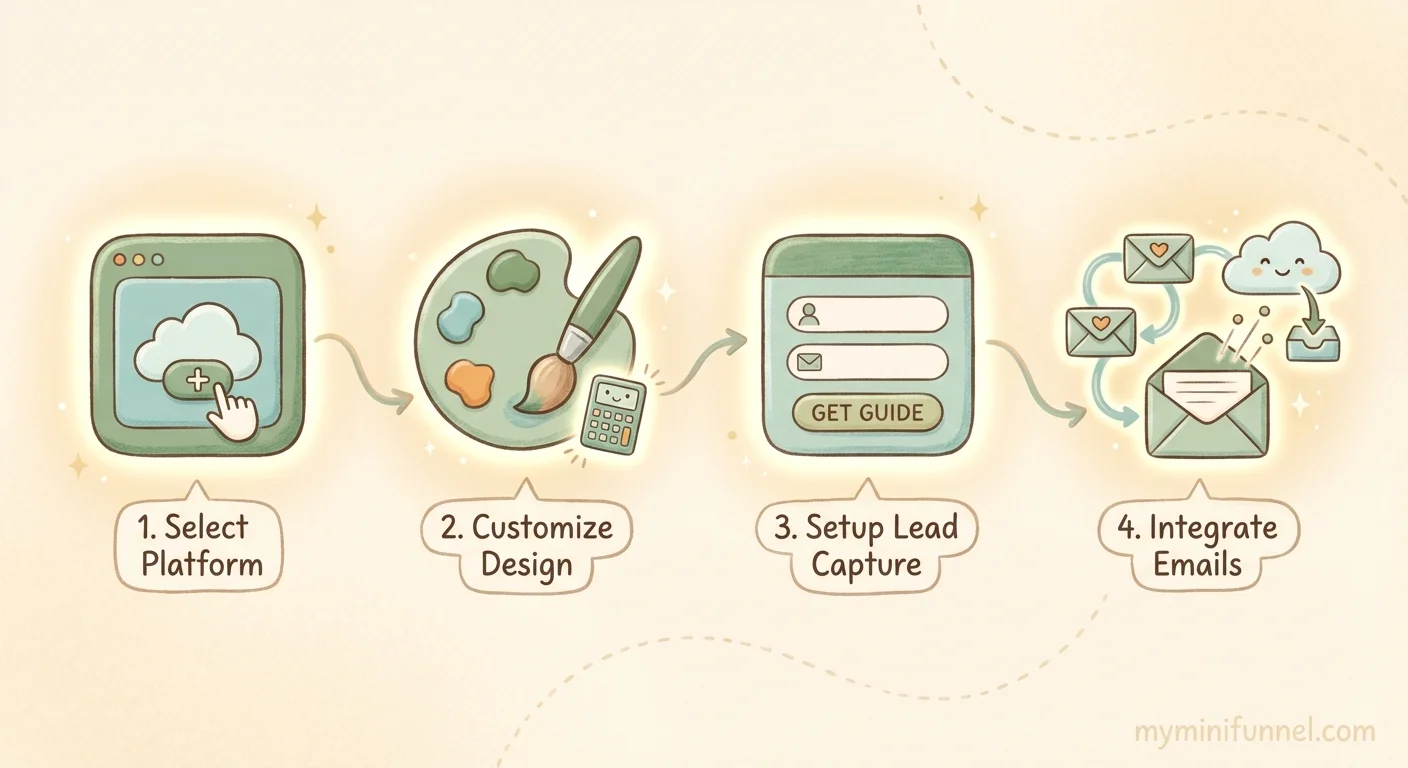
Step 1: Choose Your Tool
Several platforms let you create BMI calculators with lead capture:
- involve.me: General form builder with calculator templates
- Outgrow: Interactive content platform with various calculator options
- My Mini Funnel: Ready-made BMI calculator template built specifically for coaches
What to look for in your tool:
- Mobile-friendly design (most of your traffic comes from Instagram)
- Email integration (Mailchimp, ConvertKit, Mailerlite, etc.)
- Customizable results screen
- No coding required
If you want to browse calculator templates designed for fitness and nutrition coaches, My Mini Funnel offers 15 ready-made options including BMI, BMR, and calorie calculators.
Step 2: Customize the Experience
Once you’ve chosen your tool, customize it to match your brand:
Add your branding. Upload your logo, set your brand colors, and add a background image if the tool allows it. Your calculator should look like it belongs on your website, not a generic third-party page.
Write result descriptions that invite next steps. Instead of just showing “Your BMI is 26.5 (Overweight),” add context like: “Your BMI suggests there may be room to improve your health markers. But BMI is just one piece of the puzzle. Keep reading to understand what this number really means.”
Position results as a starting point, not a diagnosis. Be clear that BMI is a screening tool, not a health verdict. This builds trust and creates space for deeper conversation.
Step 3: Set Up Lead Capture
You have two options for when to ask for email addresses:
Before results (gated): Visitor must enter email to see their BMI. Higher email capture rate, but some visitors may bounce.
After results (ungated with follow-up offer): Visitor sees BMI immediately, then you offer to send them a detailed interpretation or next steps via email. Lower friction, but slightly lower capture rate.
For most fitness coaches, we recommend gating the results. People who enter their height and weight are already invested, and the curiosity to see their number is strong enough that most will provide an email.
What to ask for:
- Name (first name is enough)
- Email (required)
- Fitness goal (optional, but useful for segmentation)
Keep the form simple. Every additional field reduces completions.
Step 4: Connect to Your Email System
Your BMI calculator should automatically sync leads to your email marketing tool. Most calculator platforms integrate with:
- Mailchimp
- Mailerlite
- ConvertKit
- ActiveCampaign
- Loops
Set up tagging so leads from your BMI calculator get marked appropriately. For example, you might tag them as “BMI Lead” or segment by their BMI category (underweight, normal, overweight, obese). This lets you send targeted follow-up sequences.
With My Mini Funnel, email integrations are built in for Mailchimp, Mailerlite, and ConvertKit. Leads sync automatically with your chosen tags.
What to Do After Someone Completes Your BMI Calculator Lead Magnet
The calculator captures the lead. What you do next determines whether that lead becomes a client.
The Follow-Up Email Sequence
Most coaches set up a calculator and then… nothing. They collect emails but never follow up strategically. That’s leaving money on the table.
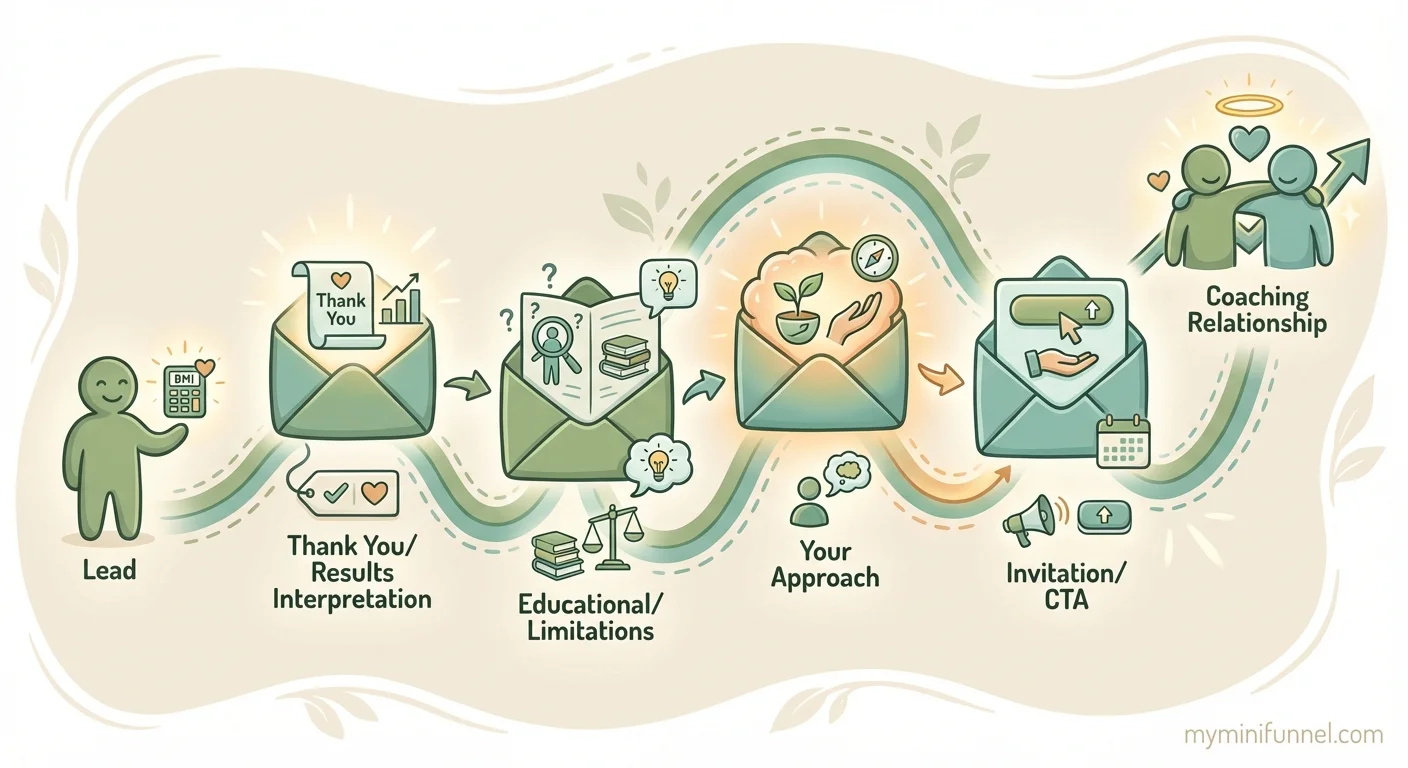
Here’s a four-email sequence that turns BMI calculator leads into coaching conversations:
Email 1: Thank You + Personalized Interpretation (Send immediately)
Subject: Your BMI result (and what it actually means)
Acknowledge their result and provide context. If their BMI was 27, explain what the “overweight” category really means, what it doesn’t mean, and why it’s just a starting point.
Email 2: What BMI Doesn’t Measure (Send day 2)
Subject: The problem with your BMI number
This is where you build credibility by addressing limitations. Talk about how BMI doesn’t measure body composition, muscle mass, or metabolic health. Introduce the idea that a complete picture requires more information.
Email 3: Your Approach (Send day 4)
Subject: How I help people in your situation
Share your coaching philosophy. If you work with clients in their BMI range, what does that process look like? What results have you seen? Keep this educational, not salesy.
Email 4: Invitation to Next Step (Send day 6)
Subject: Want to go deeper?
Offer a free consultation, a more complete assessment (like body composition analysis), or a discovery call. Make the next step clear and low-pressure.
This sequence works because it delivers value before asking for anything. By the time you extend an offer, they’ve received three helpful emails and they trust your expertise.
How to Turn BMI Results Into Coaching Conversations
When you do get on a call with a BMI calculator lead, the result gives you a natural opening.
Start with what you know: “I saw you took our BMI calculator and your result was in the X range. What made you want to check that?”
Then transition to limitations: “BMI is useful as a starting point, but it doesn’t tell us everything. It can’t measure body composition, and it doesn’t account for factors like muscle mass or how you actually feel in your body.”
Finally, offer a more complete picture: “If you want to get a fuller understanding of where you’re at and what would actually work for you, that’s what we do in our coaching assessment.”
The BMI calculator opens the door. Your expertise walks through it.
BMI Calculator Lead Magnet Examples for Different Fitness Niches
The way you position your BMI calculator lead magnet depends on your coaching niche. Here’s how different types of fitness professionals can frame it:
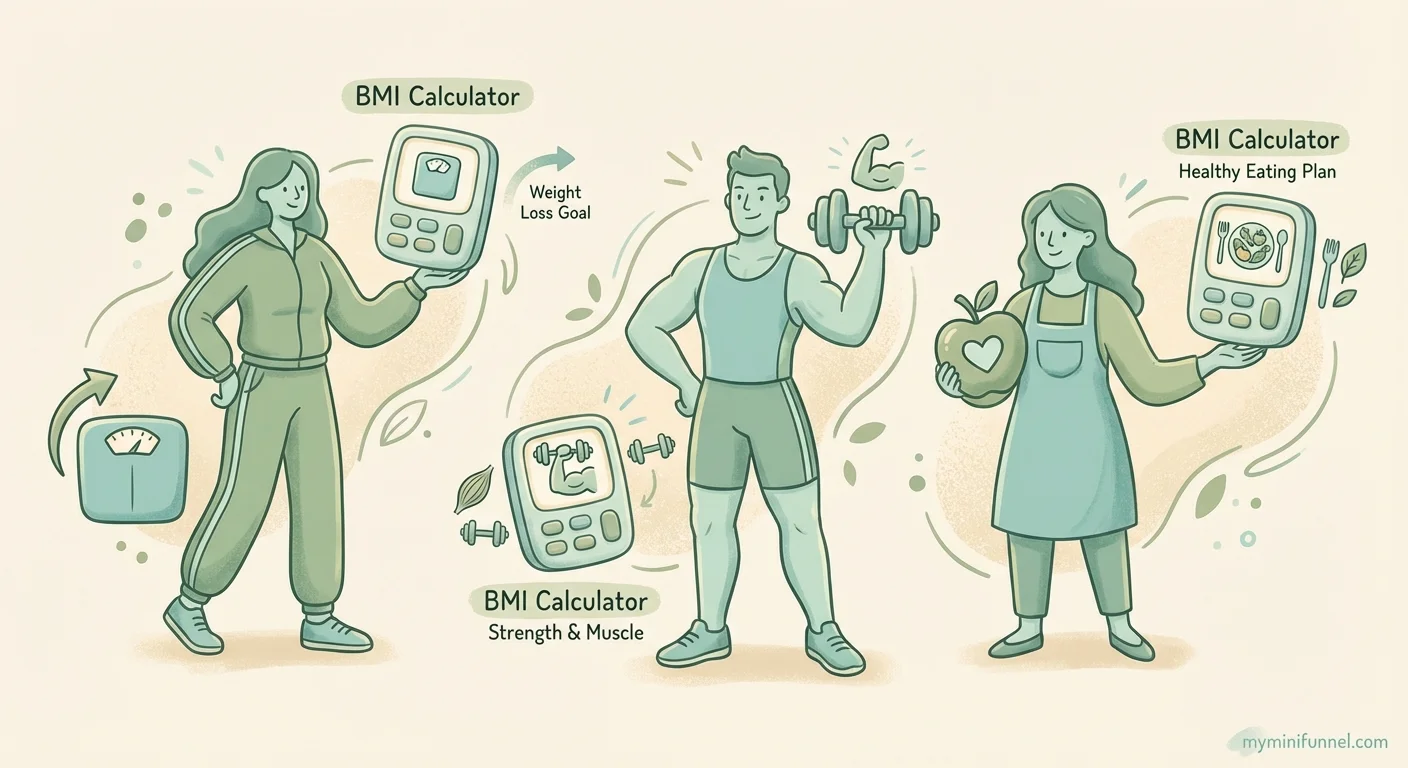
Weight Loss Coaches
Position: “Find out where you’re starting”
For weight loss coaches, BMI gives potential clients a benchmark. Your follow-up can focus on realistic timeline expectations, what “healthy weight” actually means for their body type, and why the scale isn’t the only measure of progress.
Messaging angle: “Your BMI is one number in your story. Let’s talk about what sustainable progress actually looks like for someone at your starting point.”
Personal Trainers
Position: “Get a quick health snapshot”
Personal trainers can use BMI as an entry point to discuss how strength training affects body composition. Since BMI often misclassifies muscular individuals, you have a natural opportunity to explain why building muscle matters.
Messaging angle: “BMI doesn’t know the difference between muscle and fat. That’s where real fitness assessment comes in.”
Nutrition Coaches
Position: “The first step in your nutrition assessment”
For nutrition coaches, BMI can lead into conversations about metabolic health, caloric needs, and why diet affects so much more than just weight. Many nutrition coaches pair their BMI calculator lead magnet with a nutrition profile quiz to match clients with the right dietary approach.
Messaging angle: “Your BMI tells us about weight, but nutrition is about energy, health markers, and how you feel every day. Let’s look at the complete picture.”
Beyond BMI: Other Calculator Lead Magnets for Fitness Coaches
If a BMI calculator works for your audience, consider adding complementary calculators to your lead generation strategy.
BMR Calculator
A Basal Metabolic Rate (BMR) calculator tells visitors how many calories their body burns at rest. For nutrition coaches, this is often more actionable than BMI because it directly informs meal planning.
My Mini Funnel offers a BMR calculator template that calculates daily calorie needs based on age, weight, height, and activity level. We also wrote a full guide on using a BMR calculator for nutrition coaches.
Calorie and Macro Calculator
Take BMR a step further with a calorie and macro calculator that breaks down daily protein, carb, and fat targets. This is especially valuable for coaches who work with clients on specific nutrition protocols.
Body Transformation Timeline
How long will it take to reach a goal? A body transformation timeline calculator sets realistic expectations and gives coaches a natural follow-up topic: “Here’s your estimated timeline. Want to talk about how to make it happen?”
The best approach is often using multiple calculators for different stages of awareness. Someone just starting their fitness journey might take a BMI calculator. Someone ready to commit might want their macros calculated.
For a complete overview of how interactive tools drive coaching leads, check out our complete guide to lead capture for coaches.
Common BMI Calculator Lead Magnet Mistakes to Avoid
Setting up a BMI calculator lead magnet is simple. But there are a few mistakes that reduce its effectiveness.
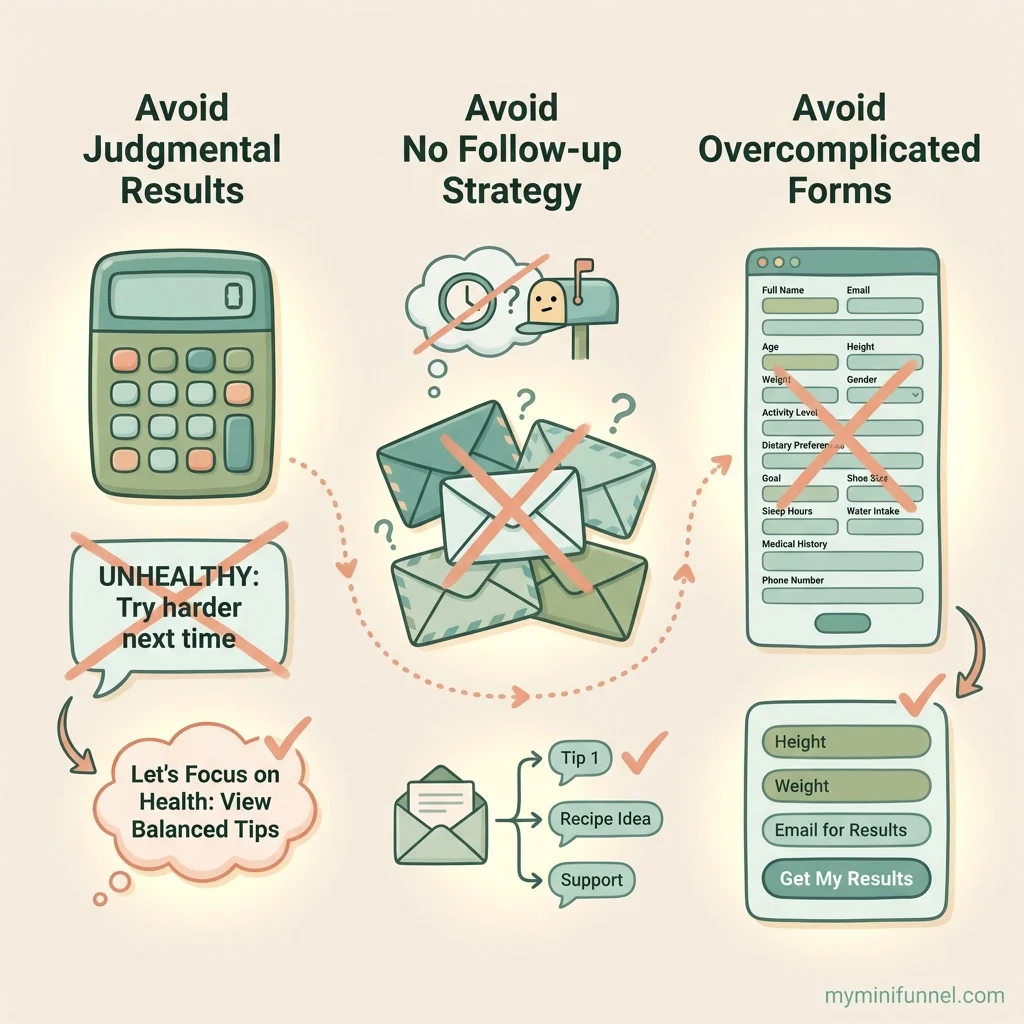
Presenting BMI as a Health Verdict
If your result screen says “Your BMI is 28. You are overweight and need to lose weight,” you’re going to lose trust fast.
People know their bodies are more complex than a single number. When you present BMI as a definitive health judgment, you come across as either uninformed or insensitive.
Better approach: Frame BMI as a conversation starter, not a conclusion. “Your BMI is 28, which puts you in the overweight category according to standard ranges. But this number is just one piece of a much bigger picture.”
No Follow-Up Strategy
Collecting emails without sending follow-up emails is like getting someone’s phone number and never calling. Your BMI calculator lead magnet captured interest. If you don’t nurture that interest, it fades.
At minimum, set up an automated email sequence. Even a simple two-email sequence (thank you + invitation to learn more) is better than nothing.
The real conversion happens in follow-up, not at the moment someone sees their BMI.
Overcomplicating the Calculator
Some coaches try to turn a BMI calculator into a comprehensive health assessment by asking 10+ questions. Don’t.
The power of a BMI calculator is its simplicity. Height and weight. That’s it. If someone wanted to answer 15 questions, they’d take a quiz.
Keep your BMI calculator simple. If you want deeper data, use a separate fitness assessment quiz for leads who are further along in their journey.
Making BMI Work for Your Coaching Business
A BMI calculator lead magnet works because it’s simple, familiar, and creates natural opportunities for conversation. Yes, BMI has limitations. But those limitations become your opening to demonstrate expertise and build trust.
Here’s what to remember:
- Calculators convert better than PDFs because they deliver instant, personalized results
- BMI’s limitations are a feature, not a bug when you use them to start deeper conversations
- Setup takes 10 minutes with the right template
- The follow-up sequence matters more than the calculator itself for turning leads into clients
- Different niches can position BMI differently based on their coaching approach
Ready to try it yourself? Start with My Mini Funnel’s BMI calculator template and have your first BMI calculator lead magnet live in minutes. It’s free to start, and you can customize everything to match your brand.
Your potential clients are already searching for their BMI. Be the coach who helps them understand what that number really means.

Lesly Garreau
Product builder, marketing strategist, men's coach
Co-founder of My Mini Funnel. Helping coaches and creators turn followers into clients with simple lead capture tools.